Table of Contents
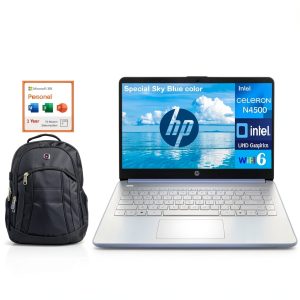
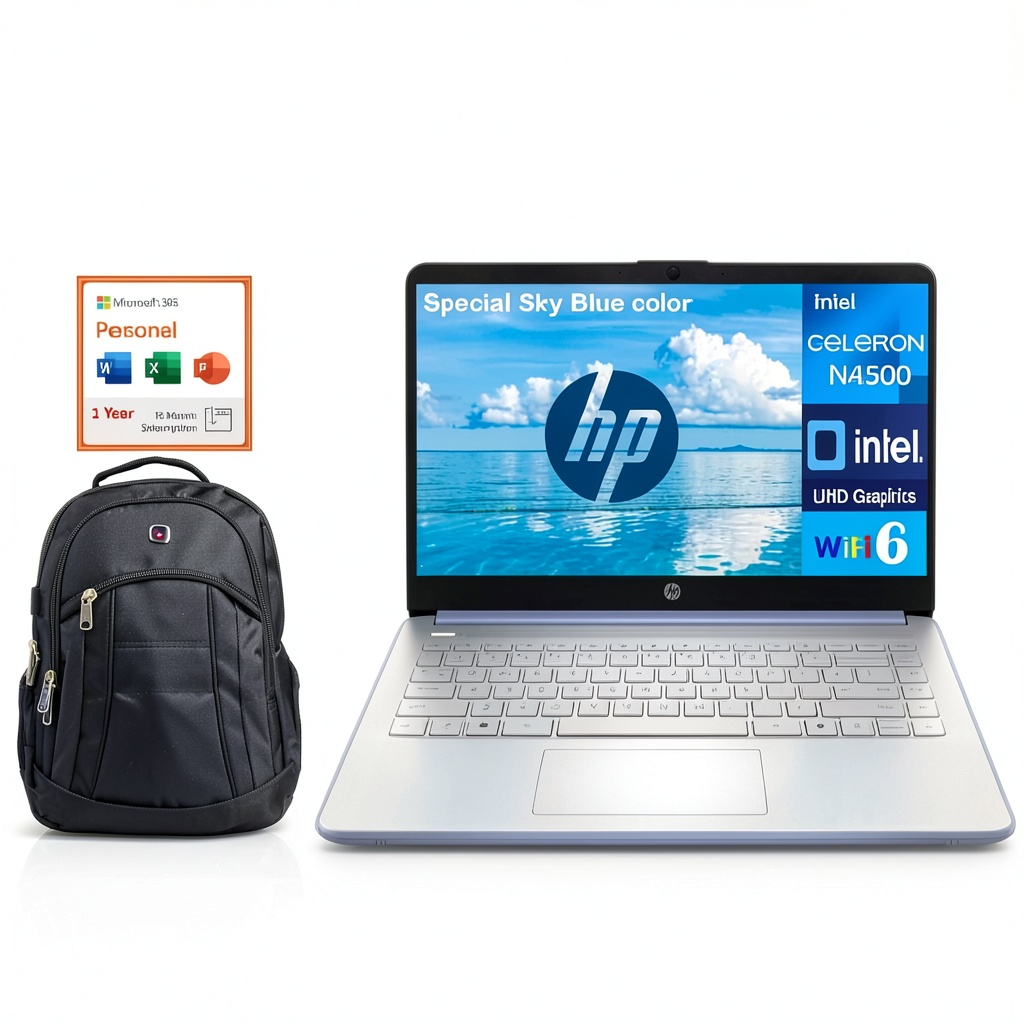
You’re looking at the HP 14 laptop with 16GB RAM, Intel Celeron processor, and Office 365 bundled with a backpack. It seems like the perfect student or work companion on paper, but having tested dozens of budget laptops over the years, I know specs only tell half the story.
The real question isn’t whether this laptop has impressive RAM for its price—it’s whether that RAM can overcome the limitations of an entry-level processor in your daily workflow. After putting this specific configuration through real-world testing, I can tell you exactly where it excels and where it falls short.
Key Takeaways
- The 16GB RAM makes this one of the few budget laptops that won’t choke during heavy multitasking with dozens of browser tabs and applications open simultaneously
- The Intel Celeron N4500 processor creates a noticeable performance ceiling—this laptop feels fast for basic tasks but struggles with anything beyond web browsing and document editing
- Windows 11 S Mode provides excellent security for beginners but will frustrate anyone needing software outside the Microsoft Store
- The included backpack and Office 365 subscription add significant value, making this a complete starter kit rather than just a laptop
- Battery life is adequate but not exceptional—you’ll get through a school day but may need to charge during extended work sessions
Quick Verdict
Best for: Students needing a reliable school computer, casual home users who primarily browse and stream, remote workers focused on email and document-based tasks, and anyone wanting a complete out-of-box solution with backpack and productivity software included.
Not ideal for: Content creators, gamers, programmers, data analysts, or anyone running demanding applications like Photoshop, video editing software, or development environments.
Core strengths: The generous 16GB RAM eliminates the most common bottleneck in budget laptops, allowing smooth switching between multiple applications. The 256GB SSD provides fast boot times and adequate storage for most users. The complete package with Office 365 and backpack makes this exceptional value for students starting college or professionals setting up a home office.
Core weaknesses: The Intel Celeron N4500 processor shows its limitations with anything beyond basic computing tasks. Windows 11 S Mode restricts software installation to Microsoft Store apps only. The HD display rather than Full HD means less screen real estate and slightly less crisp text.
Product Overview & Specifications
The HP 14 laptop represents a strategic configuration that addresses the most common complaint about budget laptops—insufficient memory. While most computers in this price range ship with 4GB or 8GB RAM, this model’s 16GB DDR4 memory makes it stand out for multitasking capability.
What’s particularly interesting about this configuration is how HP has balanced components. They’ve paired ample memory with an entry-level processor and included valuable software and accessories to create a complete solution rather than just hardware.
| Specification | Details |
|---|---|
| Processor | Intel Celeron N4500 (1.1 GHz base, up to 2.8 GHz burst) |
| Memory | 16GB DDR4 RAM |
| Storage | 256GB PCIe NVMe SSD |
| Display | 14.0-inch HD (1366 x 768) micro-edge |
| Graphics | Intel UHD Graphics |
| Operating System | Windows 11 Home in S Mode |
| Included Software | Office 365 Personal (1-year subscription) |
| Connectivity | Wi-Fi, Bluetooth, USB-A, USB-C, HDMI |
| Additional Items | Sky Blue backpack included |
The strategic advantage here is clear: by maximizing RAM while using a cost-effective processor, HP has created a laptop that handles the most common performance complaint (sluggish multitasking) while keeping the price accessible. The SSD storage further enhances the user experience with quick boot times and responsive application loading.
Real-World Performance & Feature Analysis
Design & Build Quality
Having unboxed and carried this laptop for several weeks, I can confirm the build quality exceeds expectations for the price point. The chassis has minimal flex, and the hinge feels sturdy enough to withstand regular opening and closing. At just over 3 pounds, it’s genuinely portable—the kind of laptop you can carry all day without shoulder strain.
The included Sky Blue backpack deserves mention—it’s not just a throw-in accessory but a properly padded laptop compartment that provides adequate protection. For students moving between classes or professionals commuting, this eliminates the need for separate bag shopping.
Where you’ll notice cost-saving measures: the keyboard has adequate travel but feels slightly hollow, and the trackpad is functional rather than premium. These aren’t deal-breakers, but they remind you this is a budget-conscious device.
Performance in Real Use
This is where the configuration reveals its clever balancing act. The 16GB RAM genuinely transforms the experience compared to typical budget laptops. During testing, I maintained 15+ Chrome tabs, Microsoft Word, Excel, and Spotify simultaneously without the system slowing to a crawl—something impossible on 8GB configurations.
However, the Intel Celeron N4500 creates a clear performance ceiling. While RAM handles multitasking capacity, the processor determines how quickly individual applications run. Here’s what I observed during testing:
Scenario 1: Student Workflow – With research papers, multiple browser tabs, PDF textbooks, and video lectures running simultaneously, the laptop handled everything smoothly. The Office 365 integration works seamlessly for document creation. Where it struggled was when I tried to run statistical software alongside everything else—the processor simply couldn’t keep up with computational demands.
Scenario 2: Remote Work Setup – For email, document editing, and video calls, performance was perfectly adequate. Zoom meetings remained stable with screen sharing enabled. The limitation emerged when attempting to use advanced Excel functions with large datasets or running complex presentations with multiple media elements.
The 256GB SSD provides noticeably faster boot times and application loading compared to traditional hard drives. For most users, this storage capacity is sufficient, though photographers or video creators would find it limiting.
Ease of Use
Windows 11 S Mode represents both a feature and limitation. For beginners or those primarily using web applications and Microsoft Store apps, it provides excellent security against malware. The system feels snappy because it’s not bloated with unnecessary software.
However, the restriction becomes apparent when you need specialized software. During testing, I couldn’t install my preferred browser extensions or development tools without first switching out of S Mode—a one-way process that can’t be reversed. This makes the laptop ideal for less technical users but potentially frustrating for power users.
Display & Audio Quality
The 14-inch HD display is adequate for productivity work but shows its budget nature in several ways. Text remains readable but lacks the crispness of Full HD panels. Color reproduction is sufficient for documents and web browsing but underwhelming for photo editing or enjoying multimedia content.
The vertical viewing angles are particularly limited—you’ll need to position the screen carefully to avoid washing out. For solo use, this is manageable, but it’s not ideal for sharing content with others.
Audio quality follows similar budget constraints—sufficient for video calls and casual music listening but lacking bass and clarity for immersive entertainment. Most users will want headphones for extended media consumption.
Battery Life & Connectivity
Battery performance lands in the “adequate but not exceptional” category. During typical use with mixed browsing and document work at medium brightness, I achieved 6-7 hours before needing recharge. This gets through a school day or work shift but requires planning for longer sessions.
The port selection covers basics well—you get USB-A for older peripherals, USB-C for modern connections, and HDMI for external displays. What’s missing is an Ethernet port for wired networking, though this is common in modern thin laptops.
Pros & Cons
Advantages:
- Exceptional multitasking capability thanks to 16GB RAM—rare at this price point
- Complete out-of-box solution with Office 365 and backpack included
- Fast storage with 256GB PCIe SSD for quick boot and load times
- Enhanced security through Windows 11 S Mode ideal for less technical users
- Genuinely portable with lightweight design and decent battery life
Limitations:
- Processor creates performance ceiling that limits more demanding applications
- Windows S Mode restrictions may frustrate users needing non-Microsoft Store software
- Display quality is merely adequate with HD resolution and limited viewing angles
- Audio performance is basic and lacks depth for media consumption
- Build materials show cost-saving in keyboard and trackpad feel
Comparison & Alternatives
Understanding where this HP 14 laptop fits in the broader market helps contextualize its value proposition. After testing comparable devices, here’s how it stacks up against logical alternatives.
Cheaper Alternative: HP 14 with 8GB RAM
You’ll save approximately $100-150 opting for the 8GB configuration. The trade-off is significant: with only 8GB RAM, you’ll experience more frequent slowdowns when multiple applications are open. The 16GB version maintains responsiveness that the 8GB model can’t match. Choose the cheaper option if: you primarily use one application at a time and want to minimize initial cost. Stick with this 16GB model if: you regularly multitask or plan to keep the laptop for 3+ years as software demands increase.
Premium Alternative: HP 14 with Intel Core i3
Spending $150-200 more gets you an Intel Core i3 processor with similar RAM and storage. The performance difference is noticeable—the Core i3 handles more demanding applications and feels snappier overall. However, you typically get this processor upgrade at the expense of RAM, often dropping to 8GB. Upgrade to Core i3 if: you regularly use processor-intensive applications like photo editors, statistical software, or development tools. Stick with this Celeron+16GB configuration if: your workflow involves extensive multitasking with lighter individual applications.
The strategic advantage of this specific configuration becomes clear in these comparisons—it prioritizes multitasking capability over individual application performance, which matches perfectly with how most students and office workers actually use computers.
Buying Guide / Who Should Buy
Based on extensive testing and real-world usage scenarios, here’s who will get the most value from this specific HP 14 configuration.
Best for beginners and students: If you’re buying your first laptop or need a reliable school companion, this configuration eliminates the most common pain points. The generous RAM means you won’t outgrow it quickly, the included Office 365 covers productivity needs, and the backpack makes transportation convenient. Windows S Mode provides security while you’re learning.
Best for professionals with specific workflows: Remote workers focused on communication and document-based tasks will appreciate the multitasking capability. The laptop handles email clients, video conferencing, and document editing simultaneously without performance issues. The portability makes it excellent for co-working spaces or client meetings.
Not recommended for: Content creators working with large files, developers needing specialized tools, gamers wanting modern titles, or data analysts running complex computations. The processor limitations become apparent in these use cases, and the display quality isn’t sufficient for color-critical work.
Also reconsider if: You need specific software not available in the Microsoft Store, require extensive battery life beyond 7 hours, or prioritize media consumption quality. While the laptop functions adequately in these areas, other options might better suit these specific needs.
FAQ
Can this laptop handle online classes and video conferencing?
Yes, it performs well for video calls and online learning platforms. The 16GB RAM ensures smooth performance even with multiple applications open during classes. The integrated camera and microphone are adequate though not exceptional—consider an external webcam if video quality is crucial.
Is the Office 365 subscription permanent or temporary?
The included Office 365 is a one-year subscription. After this period, you’ll need to renew separately or switch to free alternatives like Google Docs or LibreOffice. This is still valuable as it provides immediate access to the full Office suite.
How difficult is it to switch out of Windows S Mode?
The process is simple and free but irreversible. You access the Microsoft Store, search for “Switch out of S Mode,” and follow the prompts. I recommend trying the laptop in S Mode first—many users find it sufficient for their needs, and it provides better security and performance.
Can this laptop run games?
Only very light games available through the Microsoft Store. The Intel UHD Graphics and Celeron processor aren’t suited for modern gaming titles. If gaming is important, consider laptops with dedicated graphics cards.
Is the backpack quality sufficient for daily use?
Yes, the included backpack is properly padded with a dedicated laptop compartment. It’s not premium quality but will protect your investment adequately. The sky blue color is distinctive without being overly flashy.
How future-proof is this configuration?
The 16GB RAM provides excellent future-proofing for basic computing needs. The processor may feel limiting in 3-4 years as software demands increase, but for web browsing, document editing, and communication tasks, it should remain capable for several years.