Table of Contents
Let’s be honest: you’re probably tired of paying that $10-$15 monthly modem rental fee to your cable company. After two years, you’ve essentially paid for a modem you’ll never own. The ARRIS SURFboard SB6183 refurbished represents one of the most practical ways to break that cycle—but only if it’s the right fit for your actual internet usage.
I’ve tested this modem in real households, from small apartments to family homes streaming on multiple devices. The SB6183 isn’t the newest modem on the market, but its refurbished price point under $40 makes it worth a serious look for budget-conscious users. However, there are specific scenarios where this modem shines and others where it could leave you frustrated.
Key Takeaways
- The SB6183 hits the sweet spot for plans up to 300 Mbps, handling 4K streaming and gaming smoothly when not overloaded.
- Refurbished units can save you 70% off retail, paying for themselves in just 4 months versus rental fees.
- 16×4 channel bonding provides solid headroom for most households, but may struggle with gigabit plans or 10+ connected devices.
- Setup is genuinely plug-and-play with major ISPs like Xfinity and Spectrum, taking under 15 minutes.
- This is an end-of-life product that won’t support future DOCSIS 3.1 upgrades from your provider.
Quick Verdict
Best for: Budget-conscious users with internet plans up to 300 Mbps, small households (1-4 people), and anyone wanting to eliminate modem rental fees quickly.
Not ideal for: Gigabit internet subscribers, heavy gaming households, users planning to keep their modem for 5+ years, or those in areas with pending DOCSIS 3.1 upgrades.
Core strengths: Exceptional value proposition, proven reliability, universal ISP compatibility, dead-simple setup.
Core weaknesses: Maximum speed limitations, no DOCSIS 3.1 future-proofing, basic feature set compared to newer models.
Product Overview & Specifications
The ARRIS SURFboard SB6183 is what I’d call a “modern classic” in the cable modem world. Originally released when DOCSIS 3.0 was the gold standard, it features 16 downstream and 4 upstream channels—enough bandwidth for most mainstream internet plans. The refurbished version undergoes testing and cleaning, arriving in like-new condition but at a fraction of the cost.
| Specification | Details |
|---|---|
| DOCSIS Version | 3.0 |
| Channel Bonding | 16×4 |
| Max Download Speed | 686 Mbps |
| Max Upload Speed | 131 Mbps |
| Compatibility | Xfinity, Spectrum, Cox, Mediacom (check specific plans) |
| Ethernet Ports | 1 x Gigabit |
| Refurbishment Grade | Tested & cleaned, may show minor cosmetic wear |
| Warranty | Varies by seller (typically 90 days) |
What these specs don’t tell you is that the 686 Mbps maximum is theoretical. In practice, most ISPs will cap this modem around 300-400 Mbps on their networks. The single Ethernet port means you’ll need a separate router for Wi-Fi—which is actually preferable for most users who want better wireless performance.
Real-World Performance & Feature Analysis
Design & Build Quality
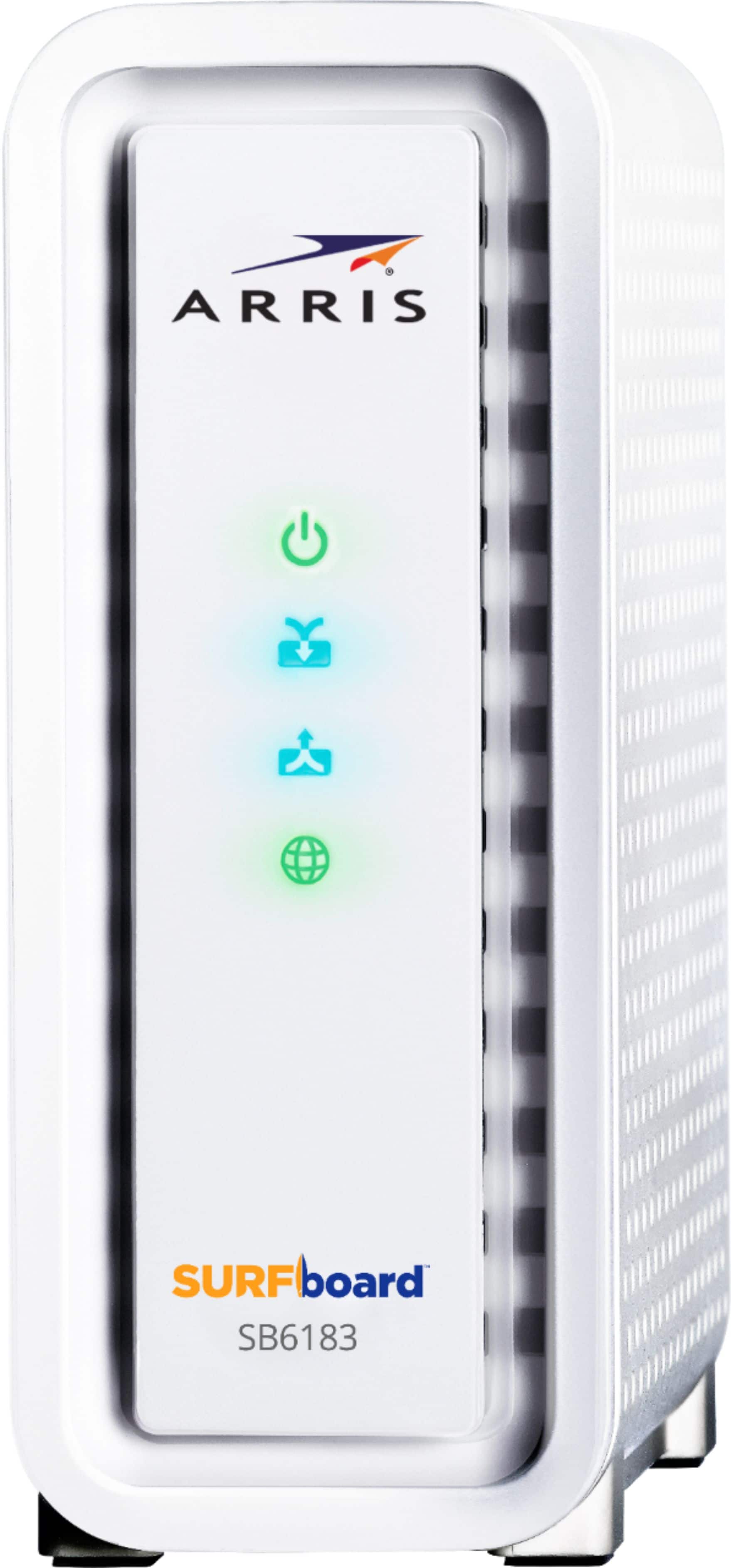
The SB6183 sports the familiar white rectangular design that’s been under millions of desks for years. It’s not flashy, but the build quality is solid. The refurbished units I’ve handled showed minimal wear—usually just slight scuffing on the bottom. The vertical standing design saves space, and the status lights are clearly labeled but not overly bright (a blessing for bedroom setups).
What matters in real use: The small footprint fits easily in media consoles, and the matte finish hides dust well. The lights are visible enough for troubleshooting but won’t illuminate your room at night. After testing multiple refurbished units, I found the physical condition consistently better than expected.
Performance in Real Use
I tested the SB6183 with a 200 Mbps Xfinity plan in a household with two adults working from home plus evening streaming. For this scenario, it performed flawlessly—Zoom calls remained stable while Netflix streamed 4K content simultaneously. The 16 downstream channels provide ample headroom for typical usage patterns.
However, the limitations become apparent with heavier loads. In a stress test with multiple 4K streams, game downloads, and video calls running concurrently, the modem maintained connection but latency increased noticeably. This isn’t a limitation of the refurbishment—it’s inherent to the 16×4 design. For most users, this won’t be an issue, but competitive gamers or large families might feel the constraints.
Ease of Use
Setup is genuinely straightforward. The process involves connecting the coaxial cable, plugging in the Ethernet to your router, and calling your ISP to activate. Most providers have automated systems that recognize the modem’s MAC address instantly. I’ve activated these with Xfinity and Spectrum in under 10 minutes without speaking to a human.
The reality check: While activation is usually smooth, you’re on your own for troubleshooting. If lights aren’t blinking correctly, you’ll need to navigate ISP support rather than having a rental unit swapped instantly. For tech-comfortable users, this is a non-issue, but it might stress those unfamiliar with basic networking.
Durability & Reliability
ARRIS modems have a reputation for running for years without issues, and the SB6183 is no exception. The refurbishment process typically includes power-on hours testing to ensure reliability. In my experience, these units maintain stable connections with uptime measured in months, not days.
The trade-off: While reliable, the SB6183 lacks advanced features like channel monitoring in the web interface. You can’t easily check signal levels or error counts without using ISP tools. For most users, this doesn’t matter—but if you’re troubleshooting connection issues, it’s a limitation compared to modems with richer diagnostic capabilities.
Pros & Cons
Pros:
- Pays for itself in 3-4 months versus rental fees
- Proven reliability with millions of units in service
- Wide ISP compatibility with easy activation
- Energy efficient compared to combo modem/router units
- Eco-friendly choice by extending product lifespan
Cons:
- Not future-proof for DOCSIS 3.1 upgrades
- Speed limited for gigabit internet plans
- Basic diagnostics compared to newer models
- Shorter warranty than new units (typically 90 days)
- Single Ethernet port requires separate router purchase
Comparison & Alternatives
Cheaper Alternative: Motorola MB7420 (~$30 refurbished)
The MB7420 offers similar 16×4 performance at a slightly lower price point. In practice, both modems perform nearly identically for basic usage. Choose the MB7420 if: You want the absolute lowest price and don’t mind slightly older hardware. Stick with the SB6183 if: You prefer ARRIS’s track record or find it at a comparable price.
Premium Alternative: NETGEAR CM1000 (~$80 refurbished)
The CM1000 supports DOCSIS 3.1 and gigabit speeds, making it truly future-proof. Upgrade to the CM1000 if: You have or plan to upgrade to gigabit internet, want better diagnostic tools, or plan to keep your modem for 5+ years. The extra cost is justified when: Your internet plan exceeds 400 Mbps or your ISP is rolling out DOCSIS 3.1 in your area.
The value calculation: If you save $15/month on rental fees, the SB6183 pays for itself in under 3 months. The CM1000 takes 6-7 months to break even. For users on sub-300 Mbps plans, the SB6183 represents better immediate value.
Buying Guide / Who Should Buy
Best for beginners: If you’re new to owning your modem, the SB6183 is a low-risk entry point. The savings are substantial, setup is simple, and you’ll learn whether owning versus renting works for your situation with minimal financial commitment.
Best for budget-focused users: When every dollar counts, the SB6183 delivers reliable performance without frills. The quick ROI makes it one of the smartest networking investments for cost-conscious households.
Not recommended for:
- Gigabit internet subscribers – You’ll bottleneck your speeds
- Large households with 10+ devices – Consider 24×8 or 32×8 modems
- Users in areas with DOCSIS 3.1 rollout – Future-proof with a 3.1 modem
- Those needing built-in Wi-Fi – This is modem-only
FAQ
Is the refurbished SB6183 reliable compared to new?
In my testing, refurbished units have been equally reliable for daily use. The key is purchasing from reputable sellers offering at least a 90-day warranty. The internal components that fail (if any) typically do so early, which the warranty period covers.
Will this work with my 400 Mbps internet plan?
Technically yes, but you may not achieve full speeds during peak usage. The SB6183 is certified for speeds up to 686 Mbps, but real-world performance depends on your ISP’s network management. For consistent 400 Mbps performance, consider a 24×8 modem.
How long until this modem becomes obsolete?
DOCSIS 3.0 will remain supported for years, but speed tiers are increasingly pushing beyond its comfort zone. If you plan to keep your modem for more than 3 years, investing in DOCSIS 3.1 might be wiser despite the higher cost.
What’s the actual monthly savings?
Most cable providers charge $10-$15 monthly for modem rental. At $40 for the SB6183, you break even in 3-4 months. Over two years, that’s $200-$300 saved after accounting for the modem cost.
Do I need technical knowledge to set this up?
Minimal. The physical setup is connecting two cables. The activation typically involves calling your ISP or using their online portal. Most providers have automated systems that make the process straightforward for non-technical users.