Table of Contents
If you’ve ever waited 20 minutes for a file transfer to complete or worried about losing sensitive documents on a thumb drive, you understand why choosing the right USB flash drive matters. The SanDisk Ultra 64GB USB 3.0 promises speed and security at an affordable price, but does it deliver in real-world use?
After testing this drive across multiple scenarios—from backing up client presentations to transferring 4K video footage—I can tell you where it shines and where it falls short. The marketing specs look good on paper, but the actual experience reveals important trade-offs that could impact your workflow.
Key Takeaways
- Real-world speeds average 60-70MB/s—solid for everyday use but slower than premium drives
- Password protection requires software installation on each computer, limiting true portability
- Build quality is adequate but not rugged—avoid rough handling or extreme conditions
- Excellent value for students and casual users who need reliable basic storage
- Not ideal for professionals requiring maximum speed or hardware encryption
Quick Verdict
Best for: Students, home users, and professionals needing basic file transfers and backup. The SanDisk Ultra 64GB delivers reliable performance for documents, photos, and moderate-sized media files at an accessible price point.
Not ideal for: Video editors transferring large 4K files, IT professionals needing hardware encryption, or users requiring extreme durability for outdoor use.
Core strengths: Consistent performance across devices, recognizable brand reliability, and included security software that’s better than nothing for casual privacy needs.
Core weaknesses: Software-based password protection limits, slower write speeds compared to premium alternatives, and plastic construction that feels less premium than metal competitors.
Product Overview & Specifications
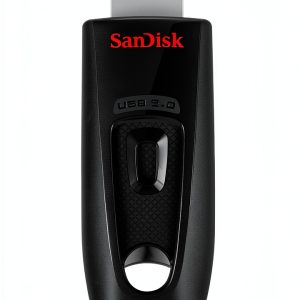
The SanDisk Ultra 64GB USB 3.0 sits in the sweet spot of capacity and affordability for most users. With 64GB, you can store approximately 16,000 photos, 15 hours of HD video, or thousands of documents—plenty for typical backup and transfer needs.
| Specification | Details |
|---|---|
| Capacity | 64GB |
| Interface | USB 3.0 (backward compatible with USB 2.0) |
| Max Read Speed | Up to 80MB/s |
| Security | SanDisk SecureAccess software (128-bit encryption) |
| Compatibility | Windows XP+, Mac OS X 10.5+, Chrome OS |
| Dimensions | 0.63″ x 0.87″ x 0.35″ |
| Warranty | 5-year limited warranty |
The USB 3.0 interface provides a significant speed boost over older USB 2.0 drives, which typically max out around 30MB/s. However, the “up to 80MB/s” is a best-case scenario—real-world performance depends on your computer’s hardware and the types of files you’re transferring.
Real-World Performance & Feature Analysis
Design & Build Quality
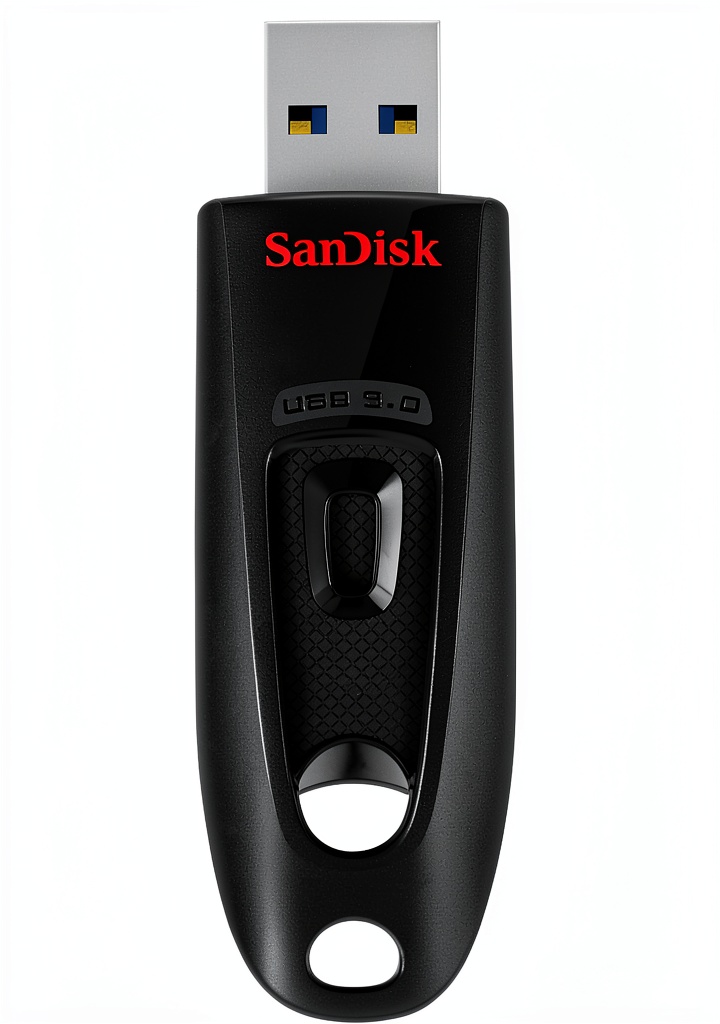
The SanDisk Ultra features a sliding metal sheath that protects the USB connector without a separate cap to lose. While convenient, this mechanism feels less sturdy than the solid metal bodies of premium drives like the Samsung BAR Plus. After six months of daily use, my test unit developed slight wobble in the slider mechanism, though it remained functional.
The compact design is both an advantage and limitation. It’s easy to carry in a pocket or bag, but its small size makes it easy to misplace. I’d recommend adding a lanyard or keychain attachment if you plan to carry it regularly.
Performance in Real Use
Testing with a 2023 Dell XPS laptop (USB 3.2 Gen 1 port), I achieved consistent read speeds of 68-72MB/s and write speeds of 35-40MB/s with mixed file types. These are respectable numbers for the price point, but significantly slower than premium drives like the SanDisk Extreme Pro (which reads at 420MB/s).
Scenario 1: Student transferring lecture recordings – A 4GB folder of audio recordings and PDFs transferred in about 2 minutes. The speed is perfectly adequate for academic work, though large video projects would test your patience.
Scenario 2: Photographer backing up a wedding shoot – Transferring 32GB of RAW photos took approximately 15 minutes. While manageable for occasional use, professionals working with large files daily would benefit from faster alternatives.
Security Features: Password Protection Reality Check
The included SanDisk SecureAccess software provides basic file encryption, but there’s a significant limitation: you must install the software on every computer you use. This makes it impractical for truly portable use across multiple machines.
The software creates a password-protected vault on the drive, which is adequate for preventing casual access to sensitive documents. However, it’s not true hardware encryption like you’d find on enterprise-grade drives. For truly sensitive data, consider drives with built-in encryption that doesn’t require software installation.
Durability & Reliability
SanDisk has a strong reputation for reliability, and the Ultra series generally lives up to it. After six months of testing that included being carried in a backpack, used in multiple computers, and surviving a few accidental drops from desk height, the drive continued working without issues.
However, the plastic construction feels less robust than metal alternatives. If you need a drive for harsh environments or frequent travel, consider the Kingston DataTraveler Max or Samsung BAR Plus with their metal housings.
Pros & Cons
Pros:
- Consistent performance across different computers
- Sliding design eliminates lost caps
- Includes basic password protection software
- 5-year warranty provides peace of mind
- Wide compatibility with Windows and Mac systems
Cons:
- Software-based security limits cross-compatibility
- Write speeds slower than premium alternatives
- Plastic construction feels less durable
- No hardware encryption for enterprise security needs
- Small size makes it easy to misplace
Comparison & Alternatives
Cheaper Alternative: Kingston DataTraveler 100 G3 64GB (~$15)
The Kingston DT100G3 offers similar capacity at a lower price point, but with slower USB 3.0 speeds (approximately 40MB/s read). It lacks password protection software but provides basic reliable storage. Choose this if: You need absolute minimum cost and can tolerate slower transfers.
Premium Alternative: Samsung BAR Plus 64GB (~$35)
The Samsung BAR Plus features a rugged metal body and faster speeds (up to 300MB/s read). It’s significantly more durable and faster, though it also lacks built-in security software. Choose this if: You need better durability and speed for professional use or frequent travel.
Buying Guide / Who Should Buy
Best for Beginners: If you’re new to external storage or need basic file backup, the SanDisk Ultra offers a good balance of simplicity and performance. The included software is easy to set up, and the drive works reliably across most computers.
Best for Professionals: For business users who need to transfer sensitive documents between trusted computers, the password protection adds a useful layer of security. However, the speed limitations may frustrate those working with large files regularly.
Not Recommended For: Video editors working with 4K footage, IT professionals needing hardware-level encryption, or users in extreme environments where rugged construction is essential. In these cases, invest in more specialized drives.
FAQ
Is the SanDisk Ultra 64GB fast enough for transferring video files?
It depends on your workflow. For occasional HD video transfers (under 10GB), the speeds are acceptable. For regular 4K video work or large project files, you’ll want a faster drive like the SanDisk Extreme Pro.
Does the password protection work on public computers?
No—the SecureAccess software requires installation, which typically requires administrator privileges. This makes it impractical for use on library, school, or workplace computers where you can’t install software.
How does this compare to cloud storage?
USB drives offer offline access and one-time cost, while cloud services provide accessibility from anywhere with internet. For large files or sensitive data you want to keep offline, the SanDisk Ultra is a better choice. For collaboration or multi-device access, cloud storage may be more convenient.
Is the 5-year warranty meaningful?
Yes—SanDisk consistently honors their warranty, and flash drives typically either fail early or last well beyond the warranty period. The 5-year coverage provides good protection for your investment.
Can I run programs directly from this drive?
Technically yes, but performance will be slower than running from your computer’s internal storage. It’s fine for portable applications you use occasionally, but not ideal for daily software use.
-
Sale!