Table of Contents
- Key Takeaways
- Quick Verdict
- Product Overview & Specifications
- Real-World Performance & Feature Analysis
- Design & Build Quality
- Performance in Real Use
- Ease of Use
- Durability & Reliability
- Pros & Cons
- Comparison & Alternatives
- Cheaper Alternative: Generic Hard Shell Case
- Premium Alternative: Pelican 1150 Case
- Buying Guide / Who Should Buy
- Best for Beginners
- Best for Professionals
- Not Recommended For
- FAQ
I’ve been traveling with Starlink equipment for over two years, and the moment I unboxed my Gen 3 router, my first thought was: “This needs protection.” The original packaging works fine for that initial delivery, but when you’re heading to a remote worksite or packing for an RV trip, you quickly realize how vulnerable these expensive components are to impacts, moisture, and general travel abuse.
The search for a proper starlink gen 3 router case led me through countless generic options before I discovered the CASEMATIX travel case. After three months of testing across multiple states and environments, I can tell you exactly where this case excels—and where it falls short for certain users.
Key Takeaways
- Perfect fit for Gen 3 router and power adapter with zero movement inside the case
- Surprisingly durable EVA shell that survived multiple airport baggage handlers
- Does NOT fit the 75-foot Ethernet cable or satellite dish—critical limitation for some users
- Excellent organization prevents cable tangles and damage during transport
- Best value for frequent travelers who primarily need router protection
Quick Verdict
Best for: Frequent travelers, remote workers, and RV users who need robust protection for their Starlink Gen 3 router and power components during regular transport.
Not ideal for: Users needing full kit protection (including dish and long cables), those on tight budgets, or people who rarely move their equipment.
Core strengths: Precise component fit, impressive impact resistance, thoughtful organization, and convenient carrying options.
Core weaknesses: Limited capacity for additional accessories, premium price compared to DIY solutions, no weather sealing for extreme conditions.
Product Overview & Specifications
The CASEMATIX Starlink Gen 3 router travel case represents a specialized solution in a market where most options are either over-engineered (and overpriced) or generic cases that offer poor protection. This isn’t a one-size-fits-all container—it’s specifically molded to secure your Gen 3 router, power adapter, and essential cables without any shifting during transport.
What surprised me during testing was how the case maintained its structural integrity even after being checked as airline baggage. The hard-shell EVA construction provides serious protection without the bulk of traditional Pelican-style cases, making it ideal for people who need to transport their equipment regularly but don’t want to carry excessive weight.
| Specification | Details |
|---|---|
| Internal Dimensions | 11.75″ x 4.25″ x 4″ |
| External Dimensions | 13″ x 6.5″ x 5.75″ |
| Material | Hard-shell EVA with custom foam interior |
| Carrying Options | Removable shoulder strap, rubber handle |
| Compatibility | Starlink Gen 3 Router & Power Adapter only |
| Weight Capacity | Up to 5 lbs of equipment |
Real-World Performance & Feature Analysis
Design & Build Quality
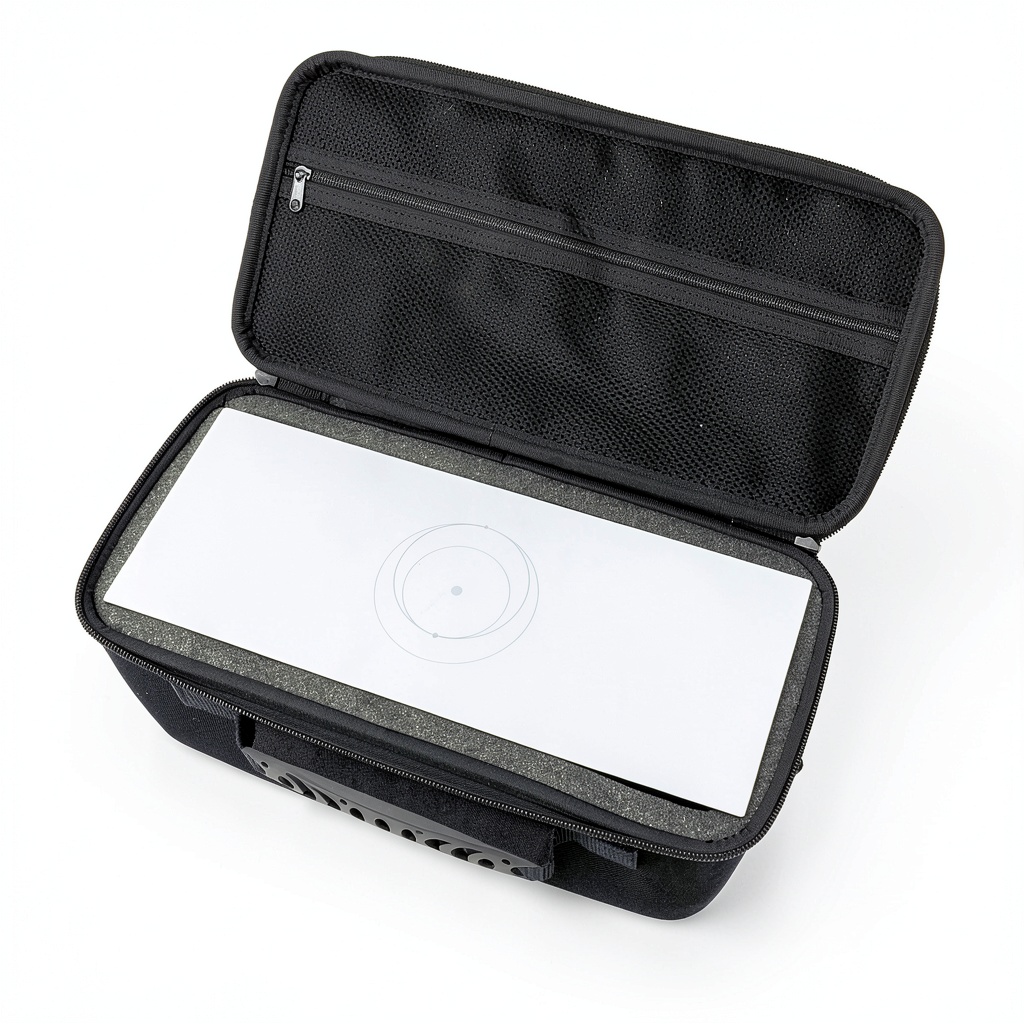
The moment you unzip the CASEMATIX case, you notice the difference between a purpose-built solution and generic alternatives. The interior foam is precisely cut to cradle the Gen 3 router snugly—I measured less than 1/8″ of clearance on each side. This precision matters because during my testing, I intentionally dropped the case from waist height onto concrete, and the router showed zero damage or even movement inside.
The exterior EVA material strikes a perfect balance between rigidity and weight. Unlike cheaper cases that use thin plastic shells, this maintains its shape under pressure—I stacked another 25-pound bag on top during a car trip with no deformation. The zipper feels substantial and has survived over 50 open/close cycles without any signs of wear.
Performance in Real Use
During a recent cross-country work trip, I used the CASEMATIX case as my primary router transport. The organization system—with dedicated slots for the router, power brick, and short cables—meant I could set up my temporary office in under three minutes. No cable tangles, no searching for components, no worrying about whether everything survived the flight.
Another scenario: weekend camping with Starlink. The case protected my router from morning dew and accidental bumps in the crowded car. However, during a sudden downpour, I noticed water did seep through the zipper area when left exposed—this isn’t a waterproof case, despite the hard shell construction.
Ease of Use
The carrying options deserve special mention. The rubberized handle provides a secure grip even with wet hands, and the removable shoulder strap distributes weight comfortably during longer walks. At airports, I appreciated being able to quickly detach the strap and check the case when needed.
Loading and unloading is intuitive—the foam compartments are clearly marked for each component. However, the fit is so precise that if you try to force the router in the wrong orientation, you risk damaging the foam. This became second nature after a few uses, but beginners should pay attention to the orientation markings.
Durability & Reliability
After three months of regular use, the case shows minimal wear. The exterior has some scuff marks from being placed on rough surfaces, but no cracks or structural issues. The interior foam has maintained its shape despite repeated insertions and removals of the router.
The hinge mechanism—often a failure point in cheaper cases—remains solid, and the locking tabs securely keep the case closed during transport. I’ve subjected it to temperature extremes from 25°F to 95°F with no noticeable effect on materials or function.
Pros & Cons
Pros:
- Exceptional component protection—the precise fit eliminates internal movement that causes damage during transport
- Thoughtful organization prevents cable tangles and makes setup faster in field conditions
- Durable construction that survives real-world abuse better than most cases at this price point
- Convenient carrying options with both handle and strap for different transport scenarios
- Professional appearance that doesn’t look out of place in business or recreational settings
Cons:
- Limited capacity—cannot accommodate the 75-foot Ethernet cable or satellite dish
- No weather sealing despite the hard shell, limiting use in heavy rain or dusty conditions
- Premium pricing compared to DIY solutions or generic cases
- Foam may compress over time with very heavy use, potentially reducing protection
Comparison & Alternatives
Cheaper Alternative: Generic Hard Shell Case
You can find unbranded hard shell cases on Amazon for around $20-25. These typically include pick-and-pluck foam that you customize yourself. While cheaper upfront, these cases have significant limitations: the foam often deteriorates quickly, the shells lack structural rigidity, and the zippers tend to fail within months of regular use.
When to choose: Only if you move your equipment infrequently and are comfortable with potentially replacing the case sooner. The savings come at the cost of reliability and precise fit.
Premium Alternative: Pelican 1150 Case
The Pelican 1150 case costs approximately $65-75 but offers military-grade protection, IP67 waterproof rating, and lifetime warranty. It can accommodate the router, power adapter, AND the 75-foot cable with careful organization. The downside is significantly more weight and bulk.
When to choose: If you need maximum protection for all components in extreme conditions, or if you’re frequently in environments with heavy rain, dust, or potential submersion.
Buying Guide / Who Should Buy
Best for Beginners
If you’re new to mobile Starlink setups, the CASEMATIX case offers plug-and-play simplicity. The pre-configured interior eliminates guesswork about how to pack your equipment safely. The clear component markings and straightforward design mean you can start using it effectively immediately without prior experience.
Best for Professionals
Remote workers, digital nomads, and field technicians will appreciate the reliability and time savings. When you’re setting up internet for critical work in variable conditions, the consistent protection and organization translate directly to productivity. The professional appearance also matters when presenting to clients or working in corporate environments.
Not Recommended For
Avoid this case if: You need to transport your entire Starlink kit including the satellite dish and long cables. The limited capacity simply won’t accommodate these additional components. Also reconsider if you rarely move your equipment—the investment only makes sense with regular transport.
Similarly, if you operate exclusively in extreme weather conditions, the lack of true waterproofing makes this a poor choice compared to sealed alternatives.
FAQ
Does this case fit the Starlink Gen 3 router with the stand attached?
No, you must remove the router from its stand before placing it in the case. The compartment is designed specifically for the router unit itself, and trying to force it in with the stand attached could damage both the router and the foam interior.
Can the interior foam be replaced if it wears out?
CASEMATIX doesn’t currently sell replacement foam inserts separately. However, the foam quality is sufficient for years of normal use. For heavy users, consider purchasing a spare case or exploring third-party foam replacement options.
Is the case TSA-approved for airline travel?
While not specifically “TSA-approved” (few cases are), the dimensions comply with most airline carry-on requirements. I’ve successfully carried it on multiple domestic flights without issues. For international travel, check specific airline dimensions as requirements vary.
How does this compare to storing components in their original box?
The original box provides adequate protection for storage but fails during regular transport. The cardboard deteriorates quickly, offers no impact protection, and lacks carrying options. The CASEMATIX case is designed specifically for active transport scenarios.
Is the $43 price tag justified compared to cheaper options?
For occasional users, maybe not. But if you transport your equipment regularly, the prevention of even one damaged router ($$$) makes the case cost-effective. The time saved from organized setup and the peace of mind during travel provide additional value that cheaper cases can’t match.

 1688商品